
Download PicTools AI Image Generator – Free AI Image Creation Tool
Introduction & Overview
PicTools AI Image Generator is a cloud‑native, AI‑driven graphics engine that turns plain‑language prompts into high‑resolution visual assets in seconds. Designed for designers, marketers, content creators, and hobbyists alike, the platform offers a clean, browser‑first interface that eliminates the need for powerful local hardware or complex installations. By leveraging state‑of‑the‑art diffusion models hosted on secure servers, PicTools can produce realistic photography, stylized illustrations, abstract compositions, or even custom brand‑specific artwork—all from a single text description.
The service operates on a generous free tier that allows users to explore core capabilities, while paid subscriptions unlock higher resolution outputs, priority rendering queues, commercial‑use licensing, and API access for automation. Because the entire workflow runs in a modern web browser, the tool is compatible with Windows, macOS, Linux, Android, and iOS devices, making it a truly cross‑platform solution. In practice, PicTools reduces the time‑to‑concept from hours to minutes, empowers teams to generate on‑demand visuals without hiring external artists, and provides a secure, scalable environment for both occasional creators and enterprise‑level production pipelines.
Key Features, Benefits & How to Use the Tool
- Text‑to‑Image Engine: Convert any descriptive sentence into a visual masterpiece using diffusion‑based AI models that understand nuance, lighting, and composition.
- Multiple Art Styles: Choose from realistic, cartoon, abstract, surreal, or custom brand style packs, ensuring every output matches your creative vision.
- High‑Resolution Exports: Generate images up to 4K resolution for print‑ready assets, large‑format displays, or detailed web graphics.
- Instant Preview & Download: Receive a low‑resolution preview within 5‑10 seconds, then download the final high‑quality file with a single click.
- Commercial‑Use License: Paid plans include full rights for commercial distribution, removing any copyright uncertainty.
- Batch Generation: Upload a CSV of prompts to produce dozens of images in one automated workflow, perfect for large campaigns.
- RESTful API: Integrate image generation directly into your applications, CMS, or marketing automation tools using simple HTTP requests.
- Secure Cloud Rendering: All data is encrypted in transit (TLS 1.3) and at rest; prompts are deleted after rendering, ensuring privacy.
- Flexible Subscription Model: Free tier for casual use, Pro for unlimited renders, Enterprise for team collaboration and custom SLAs.
- Community Prompt Library: Browse, save, and remix popular prompts shared by other creators, accelerating idea generation.
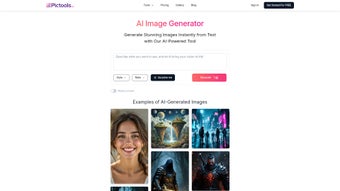
Using PicTools is intentionally straightforward. After signing in, the dashboard presents a single prompt box, a style selector, and a preview pane. Enter a clear, detailed description—e.g., “A futuristic city skyline at sunset, ultra‑realistic, with reflective glass towers.” Select the desired style, adjust optional settings such as resolution or aspect ratio, and click “Create Image.” The AI processes the request in the cloud and returns a quick preview.
If the result needs refinement, simply tweak the wording or switch styles and regenerate. Once satisfied, the “Download High‑Res” button provides PNG, JPEG, or, for Pro users, SVG/TIFF files. This iterative loop encourages experimentation while keeping the workflow efficient, making it ideal for rapid concepting, social‑media asset creation, or even final‑stage production when high fidelity is required.
Compatibility, Installation, Pros & Cons
PicTools AI Image Generator is a pure SaaS solution; there is no software to install on your local machine. All you need is an up‑to‑date web browser (Chrome, Edge, Firefox, Safari) and an internet connection. Because the rendering occurs on remote servers, the tool works on any device that can run a modern browser, including:
- Windows 10/11
- macOS 12+ (Monterey, Ventura, etc.)
- Linux distributions with recent Chromium‑based browsers
- Android 9+ tablets and smartphones
- iOS 14+ iPhone and iPad
The responsive UI automatically adapts to different screen sizes, delivering a consistent experience whether you are on a desktop monitor, a 13‑inch laptop, or a mobile phone. For teams that require deeper integration, the API key can be generated from the account settings page, and the developer portal supplies example code in Python, JavaScript, and cURL.
Pros
- Instant, high‑quality image generation from simple text.
- No GPU or local hardware requirements; works on any internet‑connected device.
- Commercial‑use licensing removes legal uncertainty for paid plans.
- Extensive style library and community prompt sharing accelerate creativity.
- API access enables automation, scaling, and integration with existing workflows.
- Secure, encrypted cloud processing protects user data.
Cons
- Free tier limits resolution and daily render count, which may be restrictive for heavy users.
- Dependence on a stable internet connection; offline usage is not possible.
- Complex prompts sometimes require trial‑and‑error to achieve the exact visual intent.
- Subscription cost for Pro and Enterprise plans can be a consideration for solo freelancers.
- Rendering queues may experience occasional delays during peak demand for free users.
Overall, PicTools AI Image Generator offers a compelling blend of speed, quality, and flexibility that makes it a standout option for anyone needing AI‑driven visuals. The only drawbacks are the internet dependency and modest free‑tier limits, but these are outweighed by the commercial‑ready licensing and robust feature set.
FAQ & Conclusion – Get Started Today
Frequently Asked Questions
Can I use the images for commercial projects?
Yes. All images generated under a paid subscription come with a commercial‑use license, allowing you to incorporate them into marketing campaigns, product packaging, client deliverables, and more without additional fees.
What file formats are available for download?
Free users can download PNG or JPEG files. Pro and Enterprise plans also support SVG and TIFF exports, which are ideal for print production and vector‑based editing.
How secure is my data during the rendering process?
All communications are encrypted with TLS 1.3. Prompt data is stored only for the duration of the rendering job and is automatically purged afterward. No personal files are retained on PicTools’ servers.
Is there an API, and how do I get started?
Yes, PicTools offers a RESTful API. After logging in, go to “Account → API Keys” to generate a token. The developer portal provides sample code, rate‑limit details, and a sandbox environment for testing.
What happens if I exceed my daily render limit?
Free users receive a notification and can resume rendering after the 24‑hour reset. Paid plans have higher or unlimited quotas, and additional “burst credits” can be purchased for unexpected spikes.
Conclusion & Call to Action
PicTools AI Image Generator stands out in a crowded AI‑art market thanks to its browser‑first design, extensive style library, and clear commercial licensing. Whether you are a solo freelancer looking for rapid mock‑ups, a marketing team needing scalable visual content, or an enterprise integrating AI generation into existing pipelines, PicTools delivers a secure, high‑quality, and cost‑effective solution. The free tier offers a risk‑free way to test the core functionality, while Pro and Enterprise plans provide the performance and legal confidence required for professional production.
Ready to transform your ideas into stunning visuals? Sign up for a free account today and start generating images in seconds. For power users, explore the Pro plan to unlock unlimited renders, priority queues, and full commercial rights. Download PicTools AI Image Generator now and experience the future of design.



.png)



